PETG Print Temp and Filament Temperature Chart
Pick a filament and type your nozzle temperature to see if it is inside the listed range, with the bed and chamber temperatures.
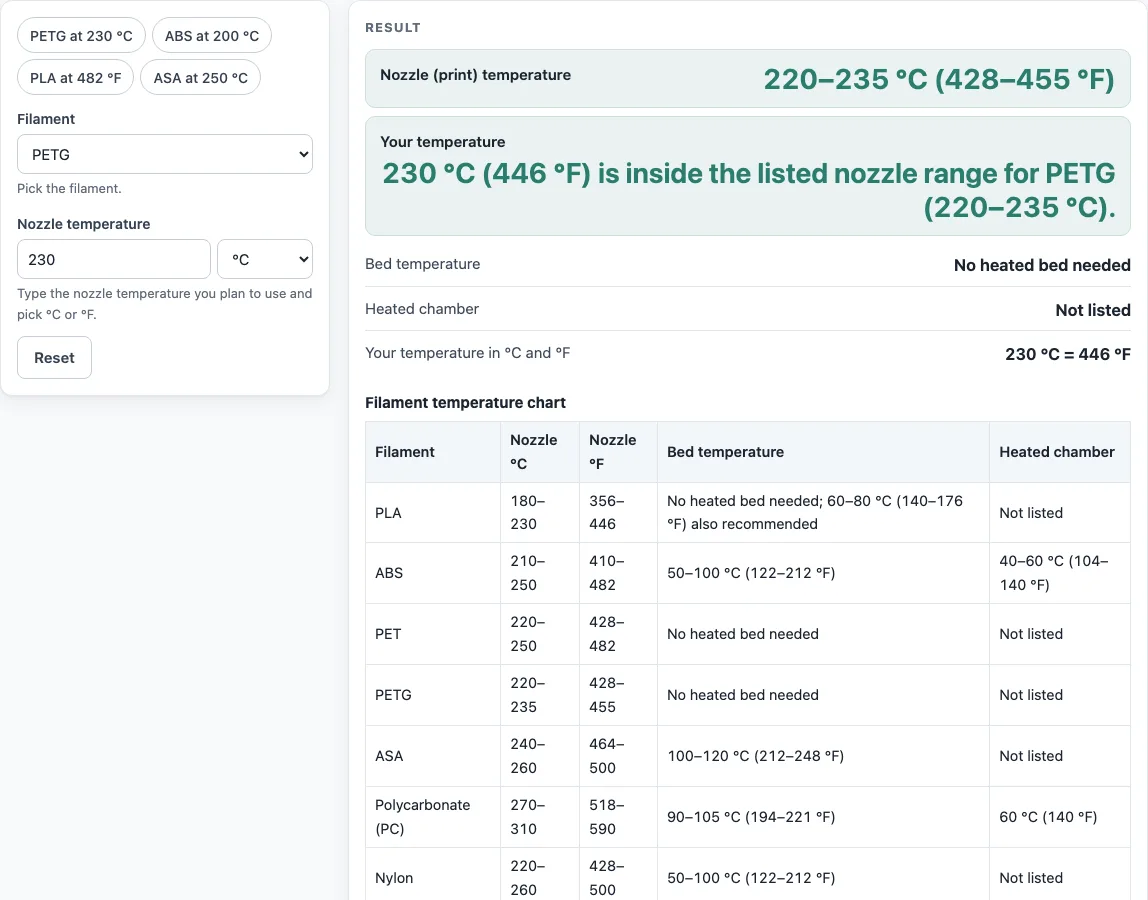
How to use the PETG print temperature checker
- Open the Filament drop-down and choose PETG. You can also click the PETG chip above the form, which loads 230 °C.
- Type your nozzle temperature into the Nozzle temperature box.
- Use the °C / °F selector to set the unit that matches your printer or spool label.
- Read the Nozzle (print) temperature line. It shows the listed range in both °C and °F.
- Read the Your temperature line. It says whether your number is inside, below or above the range, and by how many °C.
- Check the Bed temperature and Heated chamber lines for the filament’s bed and chamber needs.
- Open “How it was calculated” to see the °F conversion and the range used.
- Scroll to the Filament temperature chart to read the nozzle range, bed temperature and heated chamber of every filament in one table.
The chips above the form also load ABS at 200 °C, PLA at 482 °F and ASA at 250 °C, so you can switch materials in one click. Copy result copies the result lines with a link. Copy link copies the page address, which stores your filament and temperature in the link (the ?s= part), so you can return to the same check later. Print / save result prints the result or saves it as a file from your print dialog.
What temperature should I print PETG at?
The Materials table lists a PETG nozzle range of 220–235 °C (428–455 °F) and says no heated bed is needed.
The nozzle temperature is the temperature of the extruder that melts the filament. It is separate from the bed temperature, which is the heated surface the first layers stick to. The tool compares your number with the listed nozzle range and does nothing more. For example, 230 °C converts to 446 °F using °F = °C × 9/5 + 32 (230 × 9/5 = 414, plus 32 = 446). Since 230 °C sits inside the 220–235 °C range, the result panel marks it as inside the range.
What temperature should I print ABS at?
The Materials table lists an ABS nozzle range of 210–250 °C (410–482 °F). The Filament temperature chart shows the nozzle range of every filament in °C and °F. The chip for ABS loads 200 °C, which the tool marks as 10 °C below the listed range. Raise the nozzle temperature into the range before you start a print.
ABS also needs a heated bed. The listed bed temperature is 50–100 °C (122–212 °F). The listed heated chamber temperature is 40–60 °C (104–140 °F). These figures are general for ABS, so compare them with your spool label. Brand, colour, additives and moisture can all shift the correct settings. If your number and the spool label disagree, use the label and then adjust with test prints.
Sources
Checked October 2026:
- Wikipedia, 3D printing filament: Materials table: print (nozzle) temperature, bed temperature and chamber notes for each filament
Worked examples
| Input | Result |
|---|---|
| PETG at 230 °C | 230 °C (446 °F) is inside the listed nozzle range for PETG (220–235 °C). |
| ABS at 200 °C | 200 °C (392 °F) is 10 °C below the listed nozzle range for ABS, which starts at 210 °C. |
| PLA at 482 °F | 250 °C (482 °F) is 20 °C above the listed nozzle range for PLA, which ends at 230 °C. |
Calculated by the tool above with these values.
Frequently asked questions
Does PETG need a heated bed?
No. The Materials table says no heated bed is needed for PETG, and the Bed temperature line in the result panel shows “No heated bed needed.”
What temperature does ABS need for the bed?
ABS needs a heated bed at 50–100 °C (122–212 °F). Pick a value in that range and check your spool label for a more specific figure.
Does ABS need an enclosure?
The Materials notes recommend an enclosed heated chamber for ABS at around 40 to 60 °C (104–140 °F). The tool shows this range in the Heated chamber line.
Why does my spool label show a different temperature?
The ranges on this tool are generic for each material family. Brand, colour, additives and moisture change the best settings for a specific spool. The label or datasheet from the maker is more specific, so it should win over the tool’s range.
Does the range check mean my print will succeed?
No. The range check only compares your number with the listed range for the filament. It does not predict whether a print will stick, warp or string. Use it as a starting point, then run a small test print and adjust from there.
Related tools
- Filament calculator: use it to estimate how much filament a print will need.
- 3D printing cost calculator: use it to estimate what a print costs in material and power.
- 3D print time calculator: use it to estimate how long a print will take.
- Plastic melting point chart: use it to compare melting points across plastics.
- Plastic density chart: use it to compare the density of different plastics.
- Esteps calculator: use it to check and set your extruder steps per millimetre.