Clamping Force Calculator (Injection Moulding)
Enter the projected area of the part and runners with the material's clamp factor to get the press tonnage the mould needs.
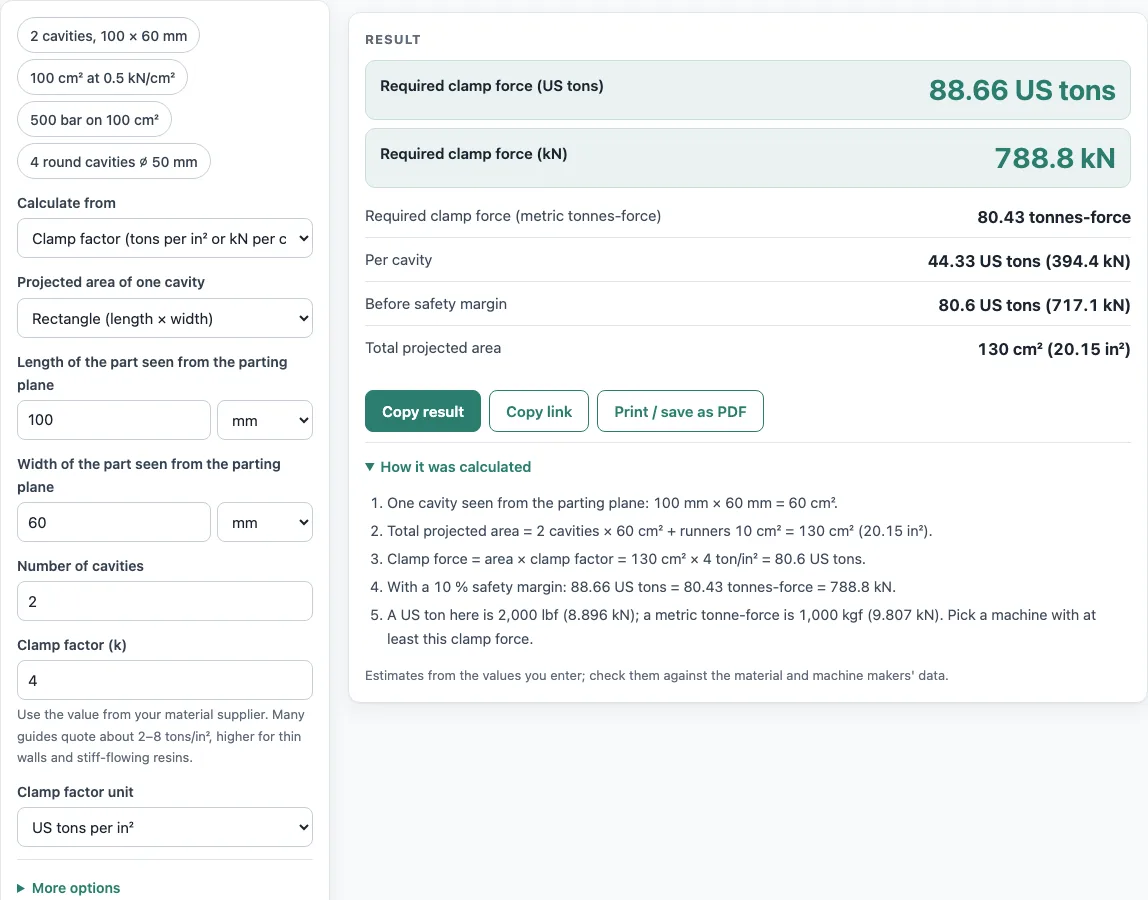
How to use the Clamping Force Calculator
- Enter the projected area of one cavity. Choose a rectangle and type its length and width, choose a circle and type its diameter, or type the area directly.
- Enter the number of cavities.
- Open More options and enter the projected area of the runners, if you want it included.
- Choose a unit for the clamp factor, either US tons per in² or kN per cm², and type your value. If you have cavity pressure instead, switch to bar, psi or MPa and enter the pressure.
- In More options, check the safety margin. It defaults to 10 %, so change it only if your process needs a different allowance.
- Read the results: the required clamp force in US tons, kN and metric tonnes-force, per cavity and before the margin, plus the total projected area.
- Open How it was calculated to see the formula and each step with your numbers.
Copy result copies the result lines with a link. Copy link copies the page address, which stores every input in the address (?s=…), so opening it later restores the same calculation. Print / save as PDF prints the inputs, results, calculation steps and the date.
Every area can be in mm, cm or inches.
How do you calculate clamping force for injection molding?
Clamp force equals the total projected area multiplied by the clamp factor, then multiplied by (1 + safety margin). Alternatively, multiply the cavity pressure by the total projected area and by (1 + margin). Both methods give the force the press must apply to keep the mould closed.
For example, take two cavities of 100 × 60 mm, 10 cm² of runner, a clamp factor of 4 tons/in² and a 10 % margin. Each cavity is 60 cm², so the two cavities give 120 cm², and adding the runner gives 130 cm² (20.15 in²). Multiplying 20.15 × 4 gives 80.6 US tons, and multiplying by 1.1 gives 88.7 US tons (about 789 kN).
What is projected area in injection molding?
Projected area is the shadow the part casts on the parting plane, measured in the direction the mould opens. Faces that lie flat against the opening direction count in full, while thin walls that run along it add very little.
For a rectangle, use length × width. For a circle, use π d² / 4. Multiply the single-cavity value by the number of cavities, then add the projected area of the runners to get the total.
What clamp tonnage per square inch?
Clamp tonnage per square inch is the clamp factor expressed in US tons for each square inch of projected area. Published guides quote 2 to 8 tons/in² (Engineers Edge) or 2 to 10 tons/in² (RJG and Plastics Technology, which suggest starting at 3), with higher values for thin walls and stiff-flowing materials. Your resin supplier or mould maker may give a figure for your grade, and the calculator shows a warning when your value falls outside 2 to 10.
As an example, 100 cm² (15.5 in²) at 2 tons/in² gives 31 US tons before the margin.
How do I choose injection molding machine tonnage?
Choose a press whose rated clamp tonnage is above the calculated result. Check the unit on the press specification, because ratings may be given in metric or US units. Compare the result in the same unit, which the tool shows in both.
The safety margin covers some uncertainty in your inputs. The 10 % default is a starting point, and you can change it in More options if your process calls for a different allowance.
What happens if clamping force is too low?
If the clamp force is lower than the pressure pushing the mould apart during injection, the mould opens slightly. Plastic then escapes at the parting line and forms thin excess material on the part, called flash. The usual fix is a press with higher rated clamp tonnage or a mould layout with less projected area.
Sources
Checked October 2026:
- RJG, Clamp tonnage and Plastics Technology: projected area of cavities and runner × tonnage factor, typically 2 to 10 tons/in² (start at 3)
- Engineers Edge, injection moulding machines: 2 to 8 tons/in², 4 to 5 for most products
- US ton = 2,000 lbf, metric tonne-force = 9.80665 kN (NIST SP 811 and NIST Handbook 44 appendix C for unit conversions (1 in = 25.4 mm, 1 US gal = 231 in³))
For estimation; verify critical designs against the applicable standard.
Worked examples
| Input | Result |
|---|---|
| area 130 cm² (20.15 in²), 4 ton/in², 2 cavities, 10 % margin | 88.66 US tons (788.8 kN) |
| area 100 cm² (15.5 in²), 0.5 kN/cm², 1 cavities, 10 % margin | 6.182 US tons (55 kN) |
| area 100 cm² (15.5 in²), 500 bar, 1 cavities, 0 % margin | 56.2 US tons (500 kN) |
| area 129 cm² (20 in²), 7000 psi, 1 cavities, 0 % margin | 70 US tons (622.8 kN) |
| area 88.54 cm² (13.72 in²), 1 kN/cm², 4 cavities, 0 % margin | 9.952 US tons (88.54 kN) |
Calculated by the tool above with these values.
Frequently asked questions
Can I use the results in a quote or job sheet?
Yes. Results may be used in commercial work, including quotes, price lists, job sheets and reports, without attribution.
Should I enter a clamp factor or a cavity pressure?
Use a clamp factor if your material supplier publishes one or you are planning from typical values. Use cavity pressure if you have it from process data. The calculator accepts either, and both produce a clamp force result.
Are my numbers uploaded or stored anywhere?
Nothing is uploaded. Everything runs in your browser. The only copy of your inputs is the one in the page address when you use Copy link.
Why does the result rise when I add runners?
Runner projected area is added to the total projected area, and the clamp force is calculated from that total. A larger runner area therefore means a higher required clamp force.
Can I calculate per cavity?
Yes. The result shows the clamp force per cavity (total divided by the number of cavities, runner share included) as well as the total.
What units does the clamp force use?
US tons (2,000 lbf), kN and metric tonnes-force (1,000 kgf = 9.80665 kN), so you can compare with any press data sheet.
Related tools
- Plastic weight calculator: use it to estimate how much plastic a part or shot weighs.
- Plastic density chart: use it to look up the density of common plastics.
- Recycling symbols chart: use it to identify the resin codes printed on plastic products.
- 3D printing cost calculator: use it to estimate the cost of a printed part.
- All calculators: use it to browse every calculator on the site.