ASA Filament: Settings and Comparison
See ASA filament print temperature, bed temperature and ratings next to ABS, PETG or any other filament in the list.
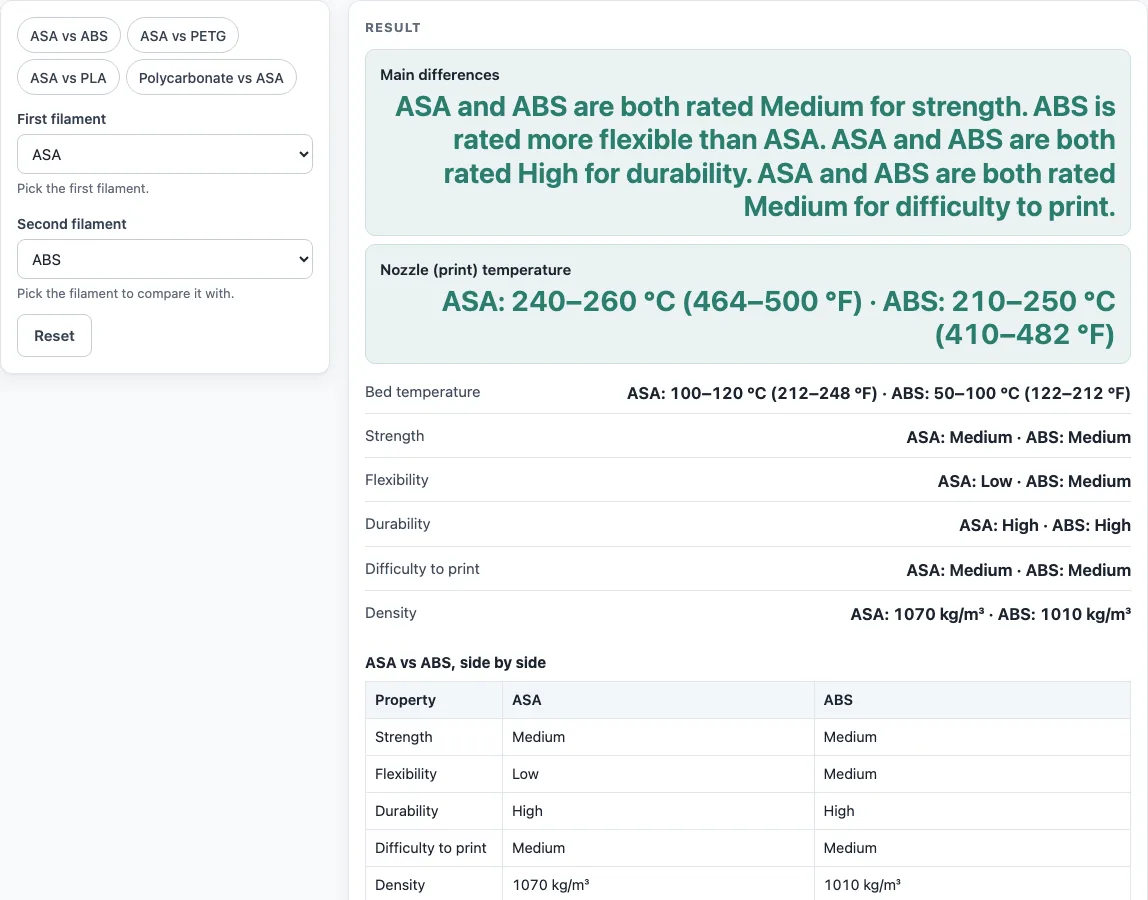
How to use the ASA filament tool
- Open the First filament drop-down and choose ASA. You can also click a chip above the form to load a pair in one click.
- Open the Second filament drop-down and choose the material you want to compare with, such as ABS.
- Read the result panel. It updates as you change either drop-down and shows Main differences, Nozzle (print) temperature, Bed temperature, Strength, Flexibility, Durability, Difficulty to print and Density for both filaments.
- Scroll to the table titled “ASA vs ABS, side by side”. It lists the same ratings plus Heated chamber and Source notes.
- If a filament has no density in the source table, the tool shows “Not listed” with a warning. Do not treat that as a value of zero.
- Change the second drop-down to compare ASA with PETG, PLA or polycarbonate. The chips above the form load ASA vs ABS, ASA vs PETG, ASA vs PLA and PC vs ASA.
Once you have a comparison you want to keep, use Copy link. It copies the page address with both choices stored in the URL, so opening it later restores the same comparison. Copy result copies the result lines with a link, and Print / save result prints the comparison. To see where the ranges come from, open How it was calculated.
What is ASA filament?
ASA filament is a 3D printing filament made from acrylonitrile styrene acrylate, an amorphous thermoplastic. It was developed as an alternative to ABS, with improved weather resistance. The name describes its three main ingredients: acrylonitrile, styrene and acrylate.
The main chemical change from ABS is the rubber component. ASA uses acrylate rubber, which has no double bonds, where ABS uses butadiene rubber. The Wikipedia article ties the better weather and UV resistance to that absence of double bonds. ASA also has a glass transition temperature of 100 °C, compared with 105 °C for ABS. ASA is mildly hygroscopic, which means it picks up moisture from the air.
What is the difference between ASA and ABS?
ASA and ABS are close relatives, and both are rated Medium for strength and High for durability on the tool’s scale. Their biggest practical differences are weather resistance, flexibility and the temperatures they need.
The tool rates each property as Low, Medium or High, using the Materials table of the Wikipedia article “3D printing filament”. These ratings describe a generic range for each material family, not one brand or spool. ABS is rated Medium for flexibility and ASA Low, so ABS is the more flexible of the two. ASA prints hotter, at 240–260 °C, than ABS at 210–250 °C, and it needs a bed of 100–120 °C, compared with 50–100 °C for ABS. The source note says ABS should be printed in an enclosed heated chamber at around 40 to 60 °C, and the tool shows that under Heated chamber and in a warning when ABS is picked. ASA density is 1070 kg/m³ against 1010 kg/m³ for ABS.
Sources
Checked October 2026:
- Wikipedia, 3D printing filament: Materials table: the ASA, ABS, PETG and other rows
- Wikipedia, Acrylonitrile styrene acrylate: what ASA is, acrylate rubber, weathering, glass transition 100 °C vs 105 °C for ABS, drying
Worked examples
| Input | Result |
|---|---|
| ASA vs ABS | ASA: 240–260 °C (464–500 °F) · ABS: 210–250 °C (410–482 °F) |
| ASA vs PETG | ASA: 240–260 °C (464–500 °F) · PETG: 220–235 °C (428–455 °F) |
| ASA vs PLA | ASA: 240–260 °C (464–500 °F) · PLA: 180–230 °C (356–446 °F) |
Calculated by the tool above with these values.
Frequently asked questions
What temperature do you print ASA at?
The reference table gives a nozzle temperature of 240–260 °C, which is 464–500 °F. Start within that range and adjust using the temperature on your spool label or datasheet, since the tool’s figures are generic.
Does ASA need a heated bed?
Yes, the reference table gives a bed temperature of 100–120 °C (212–248 °F) for ASA.
Is ASA good for outdoor use?
Yes. The table lists ASA as weather resistant and suitable for outdoor use. The Wikipedia article on acrylonitrile styrene acrylate says its weathering and UV resistance is about ten times that of ABS, and it also has better chemical resistance.
Does ASA need to be dried before printing?
It may. ASA is mildly hygroscopic, so it can absorb moisture from the air. The Wikipedia article says drying may be necessary before processing, so check your datasheet for drying settings.
Why do the numbers on the tool differ from my spool?
The tool shows generic ranges for each material family, taken from one reference table. Brands use different additives and formulas, so the temperature printed on your spool label or datasheet is the value to trust for anything that matters.
Can I compare ASA with other filaments in this tool?
Yes. The two drop-downs list 12 filaments: PLA, ABS, PET, PETG, ASA, polycarbonate (PC), nylon, TPU, HIPS, polypropylene (PP), acetal (POM) and acrylic (PMMA). Pick any two to compare them.
Related tools
- Filament calculator: use it when you need to estimate how much filament a print will use.
- 3D printing cost calculator: use it to work out what a print costs to make.
- 3D print time calculator: use it to estimate how long a print will take.
- Plastic density chart: use it to compare density across plastics beyond the two you picked here.
- Plastic melting point chart: use it to see how melting points compare across plastics.
- Esteps calculator: use it when you are tuning your printer’s extruder steps.