ABS vs PLA Comparison
Pick two filaments to compare ABS and PLA on strength, flexibility, durability, print temperature, bed temperature, density and difficulty.
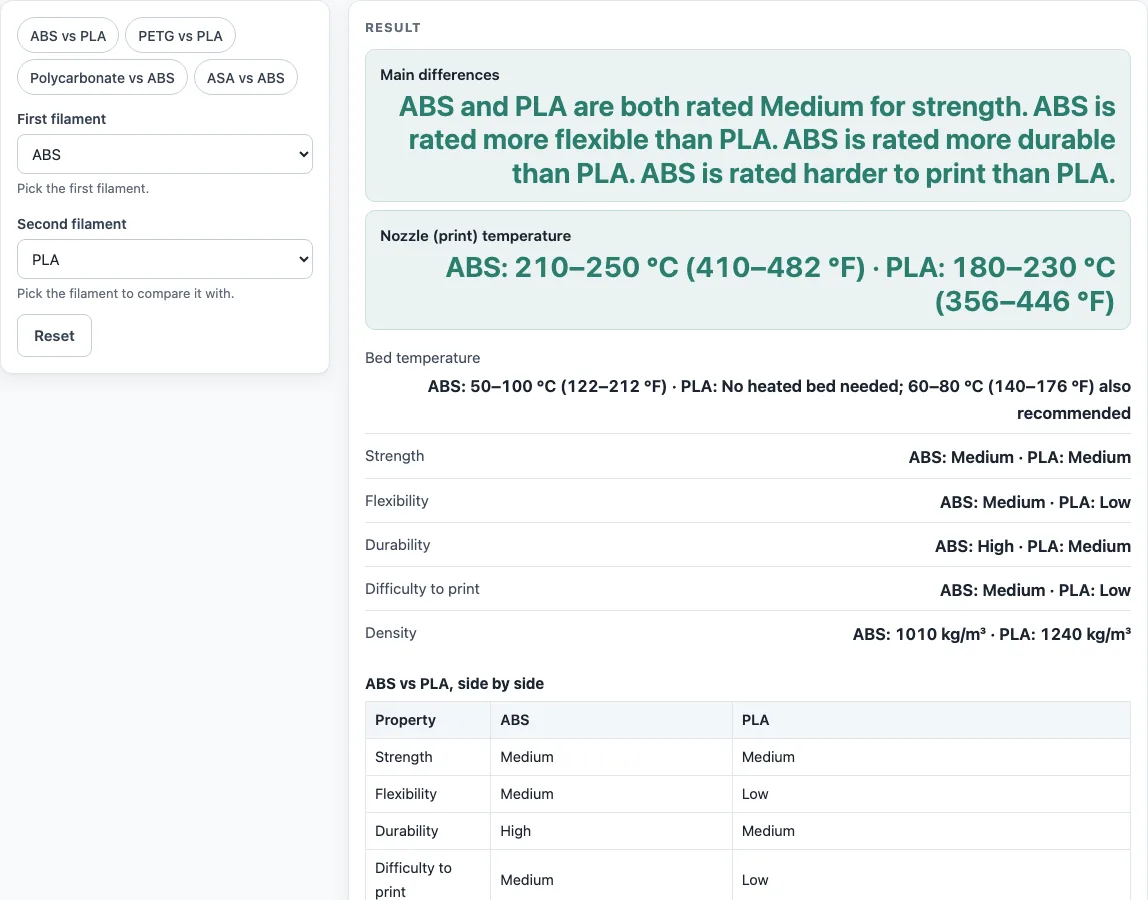
How to use the ABS vs PLA comparison tool
- Find the two drop-downs in the form, labelled “First filament” and “Second filament”.
- Open “First filament” and choose ABS.
- Open “Second filament” and choose PLA.
- To skip steps 2 and 3, click a chip above the form. Chips load a pair in one click.
- Read the result panel. It lists Main differences, Nozzle (print) temperature, Bed temperature, Strength, Flexibility, Durability, Difficulty to print and Density for both filaments.
- Scroll to the table titled “ABS vs PLA, side by side” to see the same figures in one place, plus Heated chamber and Source notes.
- If you pick ABS or polycarbonate (PC), read the warning: the source notes an enclosed heated chamber for both.
The result updates each time you change a drop-down. The chips above the form load ABS vs PLA, PETG vs PLA, PC vs ABS and ASA vs ABS, which saves you opening the drop-downs for common pairs. Use Copy result to copy the result lines with a link, or Print / save result to print the comparison. Copy link copies the page address, which stores both your choices, so opening it later restores the same comparison. Open “How it was calculated” for the ranges and the source note.
Is ABS stronger than PLA?
No. The source table rates both ABS and PLA as Medium for strength, so the tool does not call either one stronger. Strength is only one property, though. ABS is rated Medium for flexibility against PLA’s Low, and High for durability against PLA’s Medium. The source describes ABS as “durable” and “impact resistant” and uses it for functional parts, while PLA is used for consumer products. If a part needs to survive knocks and drops, ABS is the better match on the table, even though the strength ratings are equal.
These ratings are Low, Medium and High, not measured strengths. They describe each material family in general. Real parts vary with design, wall thickness and print settings.
Is ABS harder to print than PLA?
Yes. The table rates ABS Medium for difficulty to print and PLA Low, and the Main differences line says the same. The setup in the source table is part of that rating. ABS has a nozzle range of 210–250 °C, a bed temperature of 50–100 °C and a note to use an enclosed heated chamber at around 40 to 60 °C. PLA has a nozzle range of 180–230 °C and needs no heated bed, with 60–80 °C also recommended. So an ABS print has more to get right before it starts than a PLA print.
Strength is only one of the properties compared. The three practical differences here are temperature, setup and weight. ABS needs a hotter nozzle, a heated bed and, per the source, an enclosed heated chamber. PLA needs none of those, and it is the heavier of the two by density.
Sources
Checked October 2026:
- Wikipedia, 3D printing filament: Materials table: strength, flexibility, durability, difficulty, density, print and bed temperature, chamber notes
Worked examples
| Input | Result |
|---|---|
| ABS vs PLA | ABS: 210–250 °C (410–482 °F) · PLA: 180–230 °C (356–446 °F) |
| PETG vs PLA | PETG: 220–235 °C (428–455 °F) · PLA: 180–230 °C (356–446 °F) |
| Polycarbonate (PC) vs ABS | Polycarbonate (PC): 270–310 °C (518–590 °F) · ABS: 210–250 °C (410–482 °F) |
Calculated by the tool above with these values.
Frequently asked questions
Does ABS need a heated bed and an enclosure?
Yes. The table lists a bed temperature of 50–100 °C (122–212 °F) for ABS, and a heated chamber at around 40 to 60 °C. PLA needs no heated bed, although 60–80 °C (140–176 °F) is also recommended. The tool shows the chamber note under Heated chamber and in a warning when ABS is picked.
Which is lighter, ABS or PLA?
ABS is lighter for the same volume. The table gives ABS a density of 1010 kg/m³ and PLA 1240 kg/m³. The real weight of a print also depends on infill and wall settings, which density alone does not include.
Which has the higher print temperature?
ABS. Its nozzle range is 210–250 °C (410–482 °F), while PLA’s is 180–230 °C (356–446 °F). The two ranges overlap, so the ranges alone do not decide your setting.
Can I use these temperatures for my own spool?
Use the temperature printed on your spool label or datasheet for anything that matters. The figures here are generic ranges for each material family, not data for one brand or spool.
Can I compare other filament pairs?
Yes. Choose any two of the 12 filaments: PLA, ABS, PET, PETG, ASA, polycarbonate (PC), nylon, TPU, HIPS, polypropylene (PP), acetal (POM) and acrylic (PMMA). The table has no density for POM and PMMA, so the tool shows “Not listed” with a warning for them.
Does the tool keep my comparison?
Copy link copies the page address with both selections stored in it, so opening that link later restores the same comparison. Nothing is uploaded, because the tool runs in your browser.
Related tools
- Filament calculator: use it to estimate how much filament a print will need.
- 3D printing cost calculator: use it to work out what a print costs in material and power.
- 3D print time calculator: use it to estimate how long a print will take.
- Plastic density chart: use it to compare the density of more plastics than the two in this tool.
- Plastic melting point chart: use it to check melting points across plastics before you choose a temperature.
- Esteps calculator: use it when you need to calibrate how much filament your extruder pushes.