3D Print Time Calculator
Estimate print time from the volume of plastic to extrude and your layer height, line width and print speed.
The 3D print time calculator estimates how long a 3D print will take, so you can plan a job before you slice it. Enter a part’s volume, or a length or weight of filament, along with infill, layer height and print speed, and it returns an estimated print time in hours and minutes. It runs in your browser, is free, and needs no sign-up.
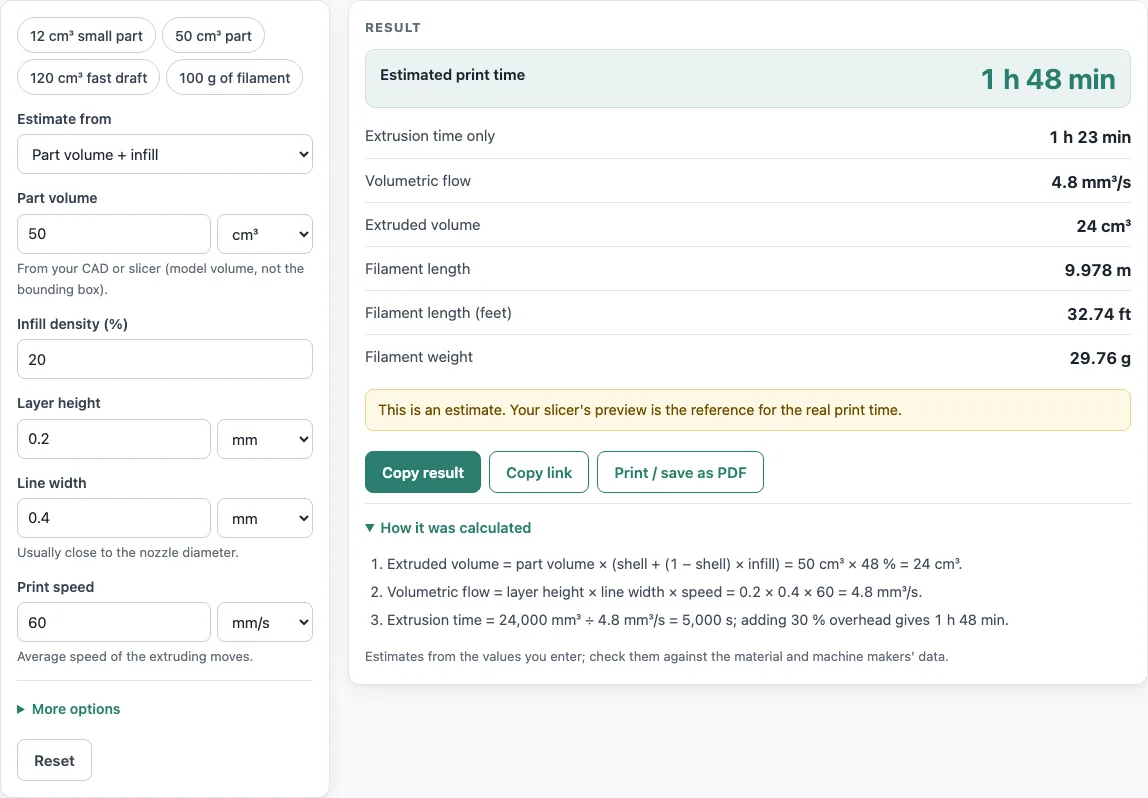
Print time depends mostly on how much plastic the printer must extrude and how fast it can lay it down. This calculator works out both: it converts your part into extruded volume, divides that by the volumetric flow your settings produce, and adds an allowance for travel moves, retraction and layer changes. The results also show filament length and weight, so you can plan material alongside time.
How to use the 3D print time calculator
- Choose your input: part volume, filament length or filament weight.
- If you use volume, enter it and pick the unit, cm³ or in³.
- Enter the infill density as a percentage.
- Enter the wall, top and bottom share as a percentage.
- Enter the layer height in the unit the tool shows.
- Enter the print speed.
- Open More options to change the overhead percentage. The default is 30 %.
- Read the results, which update as you type: estimated print time in hours and minutes, extrusion-only time, hours, volumetric flow, extruded volume, filament length (m, ft) and weight (g).
- Check the flow figure. A warning appears when the flow is above 15 mm³/s.
- Open How it was calculated to see the formula and each step with your own numbers.
Copy result copies the result lines with a link. Copy link copies the page address, which stores every input, so opening it later restores the same calculation. Print / save as PDF prints the inputs, results, calculation steps and the date. The tool works on a phone as well as a desktop.
The presets show a small 12 cm³ part, a 50 cm³ part, a fast 120 cm³ draft and 100 g of filament, so you can see how the mode, layer height and speed change the estimate.
How do you estimate 3D print time?
Start with the part’s volume, then work out how much plastic the printer actually extrudes. Divide that extruded volume by the volumetric flow your settings produce, then add an allowance for moves where the nozzle is not extruding.
The extruded volume is volume × (shell share + (1 − shell share) × infill). The walls, top and bottom are solid, and the inside is filled at the infill density. Extrusion time is extruded volume ÷ flow, and estimated print time is extrusion time × (1 + overhead %). The default 30 % overhead covers travel moves, retraction, acceleration and layer changes.
Why is my slicer time different from the estimate?
A slicer works out time from the exact toolpath, its acceleration settings and your printer’s firmware, while this calculator uses a volume-based formula with an overhead percentage. A difference between the two is normal, so the tool always notes that your slicer’s preview is the reference. If your prints consistently run longer or shorter than the estimate, adjust the overhead under More options.
How does layer height change print time?
Layer height sets how much plastic each pass lays down in height, and it directly changes the flow rate. Flow is layer height × line width × print speed, so a thicker layer moves more plastic per millimetre of travel. Doubling the layer height roughly halves the extrusion time for the same volume, which makes it the setting with the largest effect on time.
What is volumetric flow rate in 3D printing?
Volumetric flow rate is the volume of melted plastic the nozzle extrudes each second, measured in mm³/s. It is calculated as layer height × line width × print speed. For example, 0.2 mm layers at 60 mm/s with a 0.4 mm line width give 4.8 mm³/s. Flow above 15 mm³/s triggers a warning, because whether a hot end can melt that much plastic depends on the hot end, the nozzle and the material.
How does infill affect print time?
Infill lowers print time because only the walls, top and bottom are solid, and the interior is filled only to the infill percentage. Raising the infill adds extruded volume, so the estimate rises. For example, a 3 in³ part at 100 % infill, 0.008 in layers and 2 in/s takes 4 h 14 min, while a 12 cm³ part at 15 % infill, 0.16 mm layers and 50 mm/s takes 36 min.
Sources
Checked October 2026:
- Print time = volume ÷ volumetric flow (layer height × line width × speed), plus an overhead you set; volumetric flow limits as explained by Polymaker
- Typical densities checked against data sheets: Ultimaker PLA/ABS/PC/CPE/TPU, NatureWorks Ingeo 3D850, Eastman Eastar 6763 (PETG), INEOS Terluran GP-35 (ABS), BASF Ultramid B27 (PA6), Plastics International data sheets (HIPS, PTFE, HDPE, PET)
- Shell, infill and overhead defaults are examples; slicers differ
For estimation; verify critical designs against the applicable standard.
Worked examples
| Input | Result |
|---|---|
| 50 cm³, 20 % infill, 0.2 mm layers, 60 mm/s | 1 h 48 min (4.8 mm³/s) |
| 12 cm³, 15 % infill, 0.16 mm layers, 50 mm/s | 36 min (3.2 mm³/s) |
| 3 in³, 100 % infill, 0.008 in layers, 2 in/s | 4 h 14 min (4.2 mm³/s) |
| 100 g PETG, 0.3 mm layers, 50 mm/s | 3 h 47 min (7.5 mm³/s) |
| 10 m filament, 0.2 mm layers, 60 mm/s | 1 h 40 min (4.8 mm³/s) |
Calculated by the tool above with these values.
Frequently asked questions
Can I estimate from filament length or weight instead of volume?
Yes. The tool also estimates from filament length or filament weight. For example, 10 m of filament at 0.2 mm layers and 60 mm/s gives an estimate of 1 h 49 min at 4.8 mm³/s with the default 30 % overhead (1 h 40 min with 20 %).
What does the flow warning mean?
The warning appears when the volumetric flow is above 15 mm³/s. It is a prompt to check your setup, not a fixed limit, since the safe flow depends on your hot end, nozzle and material.
Can I use the results in paid work?
Yes. Results may be used in commercial work, such as quotes, price lists, job sheets and reports, without attribution.
Do I need an account, and does it work on a phone?
No. The calculator is free, requires no sign-up, and runs in your browser on a phone or a computer. Nothing you enter is uploaded.
Does the estimate include supports and brims?
Only if you include their plastic: enter the filament length or weight from your slicer’s material estimate, which already counts supports, brims and rafts.
Why does a bigger nozzle print faster?
A wider line width raises the volumetric flow (layer height × line width × speed), so the same volume is laid down in less time, as long as the hot end can melt that much plastic.
Related tools
- 3D printing cost calculator — use it to turn a print time and material use into a price for a job.
- Filament calculator — use it when you need filament use for a job and want to plan spools.
- Esteps calculator — use it when you are checking your extruder’s steps per millimetre.
- Plastic weight calculator — use it to work out how much a plastic part weighs.
- Lithophane maker: use it to make a lithophane STL from a photo.
- All calculators — use it to browse every calculator on the site.