3D Printing Cost Calculator
Enter the filament used, print time and your prices to get the full cost of a 3D print and a selling price with markup.
Popular tools
- Mil to mm Converter and Thickness ChartConvert film and sheet thickness between mil, inches, millimetres, microns and gauge, or read it off the chart.
- Trash Can Sizes: Gallons to DimensionsEnter the can capacity in gallons or litres and one dimension to get the other inside dimensions of a round or rectangular trash can.
- Types of Plastic: Groups, Codes and UsesFilter 23 plastics by group, thermoplastic or thermoset, or search by name or use to see its recycling code and typical products.
How to use the 3D printing cost calculator
- Choose how you enter filament: by weight (g, kg, oz or lb) or by length (m or ft). For length, also pick the material and the 1.75 mm or 2.85 mm diameter.
- Enter the spool price and the spool weight, so the tool can work out the price per gram.
- Enter the print time in hours and minutes.
- Enter your printer’s power in watts and your electricity price per kWh.
- Choose a currency symbol: $, €, £ or ¥. This only changes the label.
- Open the more options and choose a machine cost: none, purchase price divided by expected life in print hours, or an hourly machine rate.
- If you spend time on the job, enter labour minutes and your labour rate per hour.
- Enter a failure allowance % and, if you are pricing for sale, a markup %.
- Read the results: material, electricity, machine, labour, failure allowance, total cost, price with markup and cost per gram. The breakdown table shows each item’s share.
- Open “How it was calculated” to see the formula and each step with your numbers.
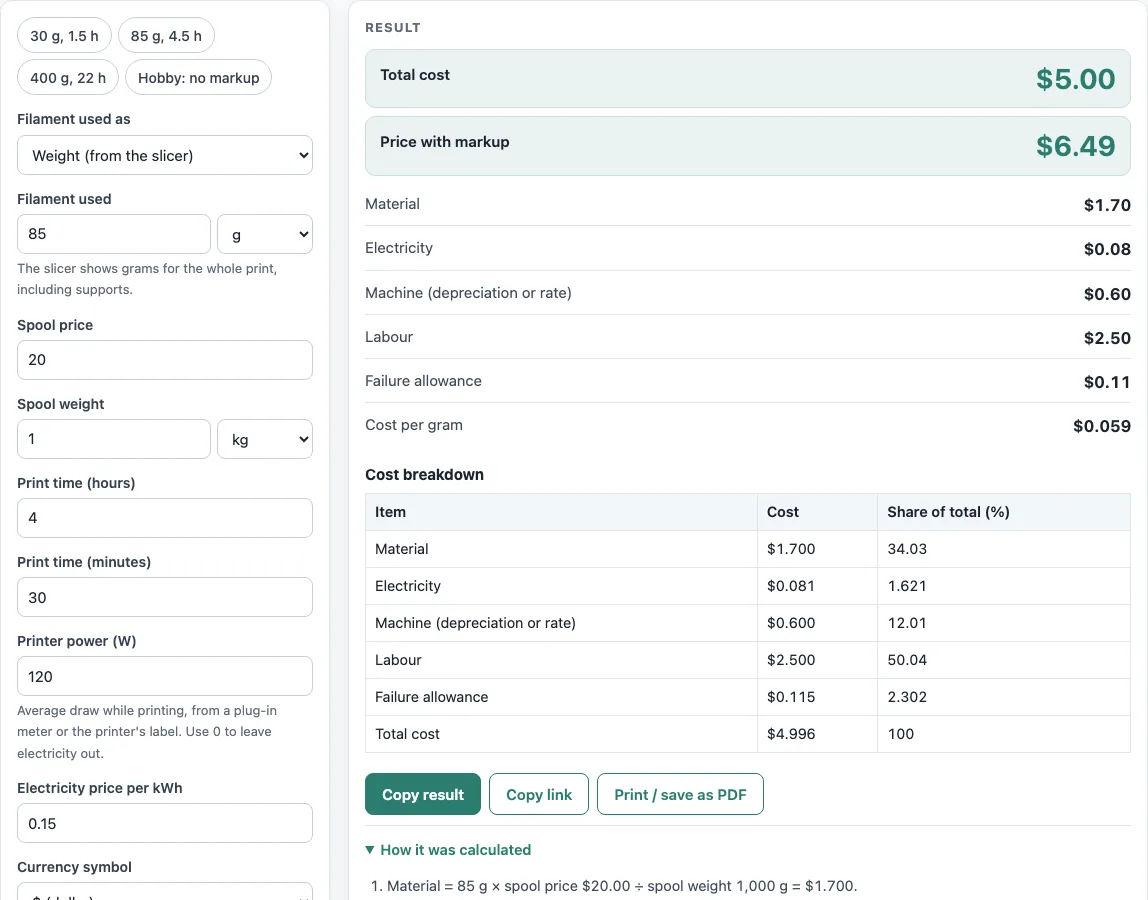
To see how the fields work, start with a preset: 30 g / 1.5 h, 85 g / 4.5 h, 400 g / 22 h, or a hobby print with no markup. Copy result copies the result lines with a link. Copy link copies the page address, which stores every input, so opening it later restores the same calculation. Print / save as PDF prints the inputs, results, calculation steps and the date.
How do you calculate the cost of a 3D print?
The total is the sum of five costs: material, electricity, machine, labour and failure allowance. Each one comes from the numbers you enter, and the markup is added at the end.
Material is grams × spool price ÷ spool grams. For example, 85 g from a spool that costs 20 per kg gives 85 × 20 ÷ 1000 = 1.70.
Machine cost depends on the option you pick. With purchase price ÷ expected life, it is print hours × (price ÷ life hours). With an hourly rate, it is print hours × the rate. Labour is minutes ÷ 60 × the rate per hour.
The failure allowance is failure % × (material + machine). It covers prints that go wrong, so it is based on the filament and machine cost only.
Total cost is the sum of all five items. Price with markup is total × (1 + markup % ÷ 100). In the 85 g example, the markup raises the total from 5.00 to 6.49.
How much electricity does a 3D printer use?
A printer’s electricity use is its power in kilowatts multiplied by the print hours. Divide watts by 1000 to get kilowatts, so a 120 W printer is 0.12 kW.
Running that printer for 4.5 hours uses 0.12 × 4.5 = 0.54 kWh. At 0.15 per kWh, the electricity cost is 0.54 × 0.15 = 0.081, which is about 0.08. Electricity is usually a small share of the total, but it still belongs in the cost.
If you don’t know your printer’s power, check the rating label on the printer or its power supply.
What does failure allowance mean?
Some prints fail and have to be reprinted. The failure allowance adds that share of the material and machine cost to every print: with 10 % failures, a print whose material and machine cost 4.00 carries an extra 0.40. Use your own failed-print rate from your printing log.
Sources
Checked October 2026:
- Filament mass = volume × density, length = mass ÷ (density × π d² ÷ 4); filament diameters from the Prusament (1.75 mm) and Ultimaker (2.85 mm) data sheets
- Typical densities checked against data sheets: Ultimaker PLA/ABS/PC/CPE/TPU, NatureWorks Ingeo 3D850, Eastman Eastar 6763 (PETG), INEOS Terluran GP-35 (ABS), BASF Ultramid B27 (PA6), Plastics International data sheets (HIPS, PTFE, HDPE, PET)
- Spool price, printer power, machine cost and labour are example inputs: enter your own. For reference, the US average residential electricity price was 18.31 ¢/kWh in July 2026 (EIA Electric Power Monthly, table 5.6.A)
For estimation; verify critical designs against the applicable standard.
Worked examples
| Input | Result |
|---|---|
| 85 g, 4 h 30 min, spool $20.00 | Total cost $5.00, Price with markup $6.49 |
| 250 g, 14 h 0 min, spool $20.00 | Total cost $12.81, Price with markup $19.21 |
| 40 m filament, 4 h 30 min, spool $25.00 | Total cost $3.14, Price with markup $3.14 |
| 3 oz, 4 h 30 min, spool €22.00 | Total cost €6.86, Price with markup €8.91 |
Calculated by the tool above with these values.
Frequently asked questions
How much does it cost to 3D print per gram?
The filament part costs the spool price divided by the spool weight. A spool that costs 20 per kg works out to 0.02 per gram. The results also show cost per gram for the whole print, which includes electricity, machine time and labour.
Can I calculate cost from filament length?
Yes. Enter the length in metres or feet, choose the material and the 1.75 mm or 2.85 mm diameter, and the tool converts it to grams using typical densities, such as 1.24 g/cm³ for PLA. If you can weigh the spool or part, enter the weight for a more exact result.
How do I include printer wear in the cost?
Open the more options and choose a machine cost. Purchase price ÷ expected life in print hours spreads the printer’s price over the hours it runs. If you already know an hourly rate for wear, choose that instead. Choose none to leave wear out.
How do I price 3D prints for selling?
Add labour minutes, a failure allowance based on your own failed-print rate, and a markup %. For quotes, machine time and labour often matter as much as the filament, so leaving them at zero will underprice the job. The price with markup is total × (1 + markup %).
Is this 3D printing cost calculator free to use?
Yes. It is free, needs no sign-up, and runs in your browser. Nothing is uploaded, and it works on a phone.
Can I use the results in commercial work?
Yes. You can use the results in quotes, price lists, job sheets and reports without attribution.
Related tools
- Filament calculator: use it to work out how much filament a print needs before you cost it.
- 3D print time calculator: use it to estimate print hours, the time figure this cost calculator needs.
- Esteps calculator: use it to check and set your extruder steps per millimetre.
- Plastic density chart: use it to compare the density of different plastics when converting length to weight.
- Epoxy resin calculator: use it to work out resin mix amounts for casting or coating projects.
- All calculators: use it to browse every calculator on the site.